Some links on PCFix411 may earn a commission from GearReady, software partners, or Amazon Associates at no extra cost to you.
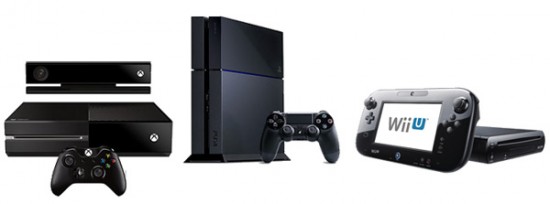
PlayStation 4, Xbox One and their upgraded variants defined much of the eighth-generation console era. In 2026, these systems are best understood as legacy platforms: still useful for existing libraries and inexpensive gaming, but no longer the baseline for current high-end performance.
This refresh looks at whether an eighth-generation console or a PC makes more sense today, with emphasis on cost, software support, upgradeability and the games you actually want to play.
Why Eighth-Generation Consoles Still Matter
Older consoles can remain useful because they have mature game libraries, simple setup and a large used market. If you already own one and the games you play still run well, there may be no urgent reason to replace it.
The main limitation is fixed hardware. Storage can sometimes be replaced or expanded, but CPU and GPU performance are effectively locked for the life of the system.
Where a Modern PC Pulls Ahead
A current PC can deliver faster storage, more memory, stronger CPUs, higher frame rates and broader software compatibility. It can also serve as a work, school or creator machine rather than a single-purpose entertainment device.
The tradeoff is complexity. PC buyers must match the CPU, GPU, motherboard, RAM, storage, power supply, cooling and case while also considering Windows, drivers and game settings.
Used Console vs Budget Gaming PC
A used eighth-generation console can be one of the cheapest ways to access a large catalog of games, especially when physical discs are available locally. A budget gaming PC usually costs more initially, but it can offer inexpensive game sales, free online multiplayer in many titles and incremental hardware upgrades.
Do not compare hardware prices alone. Include the games you already own, subscription costs, controllers, storage expansion, monitor or TV requirements and the useful life you expect from the platform.
Performance Expectations
Eighth-generation consoles were designed around 1080p-era targets, with enhanced models pushing higher resolutions in selected games. Modern PCs can exceed those targets easily, but actual performance varies widely by graphics card and CPU.
For older games, even a modest current PC may provide higher frame rates, shorter loading times and more graphics options than the original console release. Compatibility, however, is game-specific.
Backward Compatibility and Existing Libraries
Your existing library can be the deciding factor. If you own dozens of console games, moving to PC may mean rebuying titles that are available there. If you already have a large Steam, Epic or other PC library, staying on PC can be cheaper over time.
Check official platform support for the exact games you care about rather than assuming every older title will transfer or remain available digitally forever.
Storage Upgrades
One of the most noticeable quality-of-life improvements for older hardware is faster storage where the platform supports it. On a PC, replacing a hard drive with an SSD can dramatically improve Windows responsiveness and loading behavior.
See How to Choose an SSD for Your PC before buying a PC storage upgrade.
Controllers and Input
PC supports many console-style controllers in addition to keyboard and mouse. That means moving to PC does not require giving up controller-based games. The main difference is that PC may require additional configuration, firmware or game-specific input settings.
When Keeping an Eighth-Generation Console Makes Sense
- Your current game library still meets your needs.
- You want the lowest-cost way to keep playing older titles.
- You prefer a plug-and-play living-room system.
- You do not need newer games that have moved beyond the platform.
When Moving to PC Makes More Sense
- You want a machine for gaming plus work or creation.
- You want higher frame rates and graphics flexibility.
- You value component upgrades over replacing the whole system.
- Your favorite titles are available on PC and your library is already there.
Amazon Video-Game Comparison
For current marketplace browsing, use PCFix411’s approved Amazon Best Sellers in Video Games link.
PCFix411 may earn commissions from qualifying purchases. As an Amazon Associate I earn from qualifying purchases.
Bottom Line
An eighth-generation console can still be a good low-cost platform for an existing game library, but a modern PC offers more performance headroom, broader use and upgradeability. The right decision depends less on generation labels and more on the games you own, the performance you expect and how much additional functionality you need from the hardware.